Email me at midwesternmeso (AT) hotmail [DOT] com

Please note: All images and videos on this blog are copyrighted by myself and may not be used without written permission. Any persons or entities who do not seek written permission will be held liable for copyright infringement(s) and will be subject to monetary compensation not to exceed $150,000 USD. (In pursuant to 17 USC Section 504(b) and (c), 17 USC Section 505.)
Showing posts with label Photoshop Tutorial. Show all posts

Friday, January 25, 2008

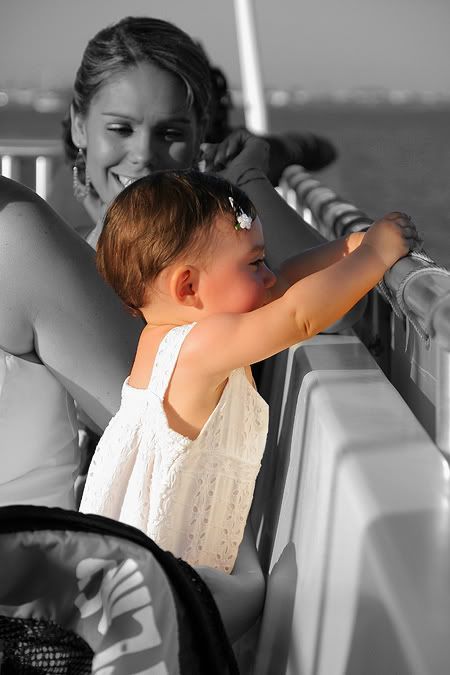
Separating color within a photo

EDIT: Blogger doesn't like vertical photos obviously, so they constrain it more than it should be. Click on it to view the correct size.


I learned a neat trick in Photoshop yesterday, that I have always wanted to know how to do, but thought it was too hard. It's about as easy as Photoshop gets. If you are familiar with it, open the photo you want, duplicate the layer (so it's the same photo twice), go to Image> Adjustments, Desaturate. Do this to both images. On your new layer (not your background pic), simply use the History brush on your tool bar, and brush in the colored area you want. If you go outside the lines, no worries, the eraser tool will clean it back up with the black and white.

Once you get the majority of it in, you can zoom in and do it pixel by pixel if needed. Then simply flatten the image, and you're done.

The picture is of my niece, Keira, at my sister's wedding in the bay near South Padre Island, TX last June. I used to play with her every day until my sister moved to Denver. She loves Elmo. I miss her a lot! She is now talking and walking around at almost 18 months.

I'll post a tutorial this weekend, maybe, if I get time.

Thursday, October 25, 2007

Boredom in the Fall

Perhaps a nice cold-core system will make it here before the end of the year, but seeing how the fall has fell short (ha) of expectations, I highly doubt it. I'm gonna work on a photo processing tutorial this weekend, for those who are lazy like myself, and want decent results. It seriously takes 2-3 minutes per photo, and mucho thanks credited to the Don himself, Mike of Blair, Nebraska. It will be basic, simple, easy-to-understand, and hopefully helpful. I did much studying on this stuff, obsessive reading;research on a few techniques, and once you get it down... will come easily.

Contact Me

Contact me @
midwesternmeso AT hotmail (DOT) COM

wibiya widget